Most free online radio directories begin with a list. RadioFM Pro begins with a map, which changes how the directory feels: stations are signals tied to places, not just rows ordered by popularity.
For this RadioFM Pro review, I followed one repeatable listening session on July 21, 2026. I recorded the live directory count, searched for jazz, applied the Jazz genre filter, started Adroit Jazz Underground, checked how the map and player reacted, opened the station record, and saved it as a favorite. I then compared those visible behaviors with the site’s public explanations of Radio Browser data, GeoNames location enrichment, stream formats, and playback recovery.
This is a test of the current web app, not a claim that I have listened through it for months. Internet radio is too dynamic for that kind of casual certainty anyway: stations rename themselves, streams fail, metadata ages, and directory counts change between visits.
Test snapshot: what was live on July 21, 2026
At the time of testing, the home search reported 12,651 matching stations in its currently healthy set. The header still described the broader directory as “60,000+ signals.” Those two numbers are not contradictory if read carefully. One is a broad catalog message; the other is the filtered, currently usable result set returned to the interface at that moment.
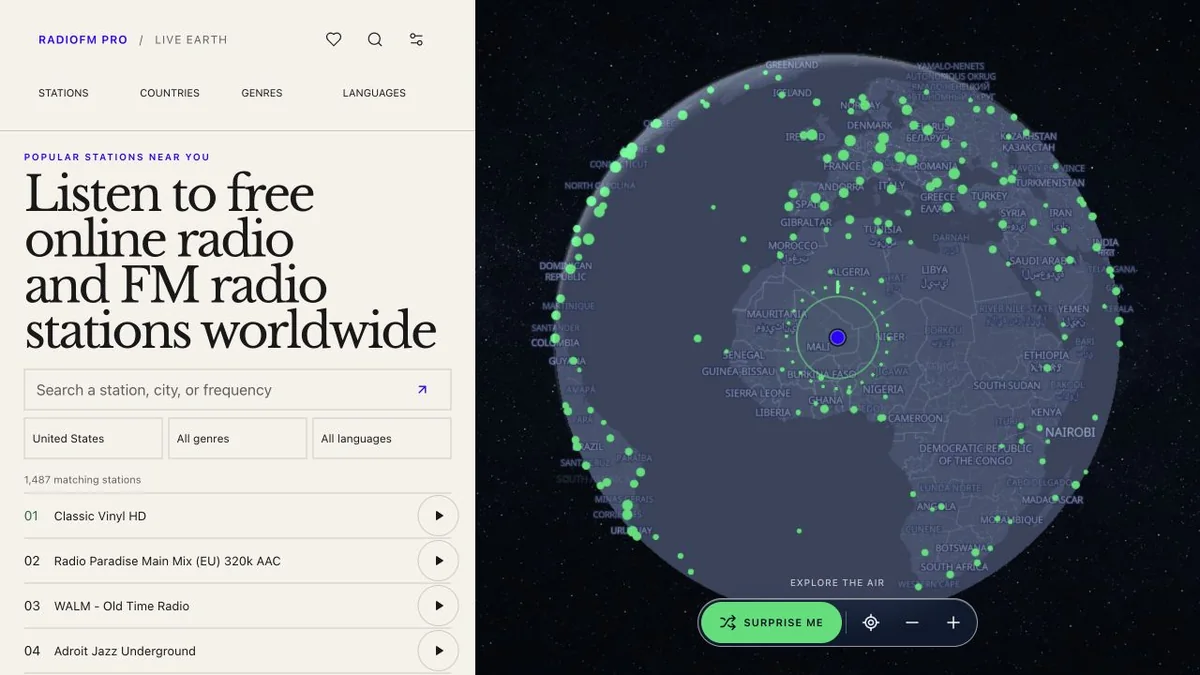
Live directory view captured July 21, 2026; station totals are time-sensitive and should not be treated as a permanent inventory.
The page exposed search plus Location, Genre, and Language filters. It also showed a compact featured list with station name, inferred place, codec, and bitrate. The right side of the desktop layout was the interactive radio map.
This first screen communicates the product’s real strength: browsing and listening are part of one workspace. A list-only directory makes location a text label. Here, selecting or playing a station creates a visible geographic focus.
The jazz search: broad query first, precise filter second
I typed jazz into the main search. The broad query returned 498 matching stations because the term could match a station name, a place field, a tag, or other indexed directory text. I then selected Jazz in the Genre control. The count narrowed to 461 matching stations.
That distinction is useful. Search is not pretending that every textual jazz match has a perfectly normalized genre. The explicit filter lets a listener choose how strict to be.
The first results included Classic Vinyl HD, Adroit Jazz Underground, SomaFM Secret Agent, and an Opus version of Adroit Jazz Underground. The presence of both a main MP3 record and another codec variant illustrates a common directory issue: one broadcaster can expose multiple endpoints, and they may appear as related but separate records.
I selected Adroit Jazz Underground. Playback began in the persistent bottom player, the list’s play control changed state, and the map focused on the station’s stored location around New York. The player remained available while I continued navigating.
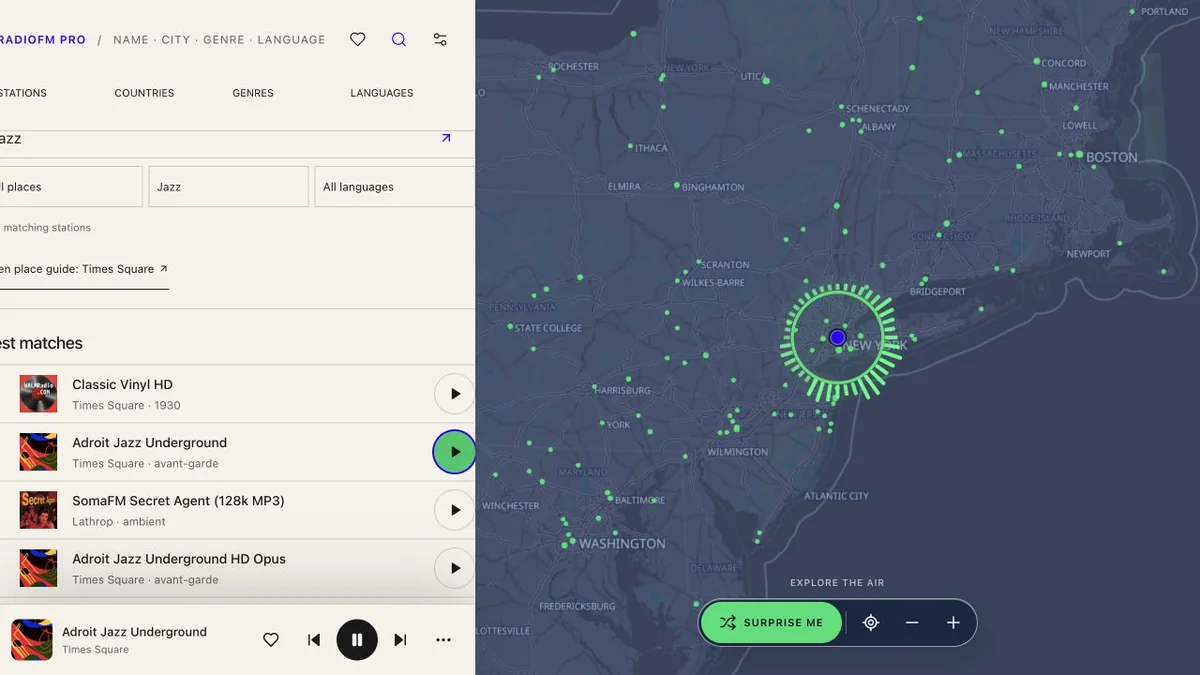
Hands-on playback test on July 21, 2026: jazz plus the Jazz genre produced 461 results and the selected MP3 stream entered the playing state.
This was the most convincing part of the review. The map was not a static illustration. It responded to the active station, while the playback dock retained track context and transport controls. Search, map position, and audio state felt like parts of the same application.
I confirmed the browser reached a playing state. I did not measure hours of uninterrupted listening, compare audio fidelity with the broadcaster’s original player, or test regional restrictions from multiple countries. A successful start is evidence that the endpoint worked from this browser at this time—not a service-level guarantee.
What the map adds, and what it cannot prove
An internet radio map is valuable for discovery. Zooming around a region can reveal stations a genre ranking would never surface. It also makes duplicate or surprising location labels easier to notice.
But a dot on a map can look more authoritative than the underlying data deserves. RadioFM Pro’s public station pages explain that GeoNames is used only when coordinates or a precise place pass location-confidence rules. Missing or unreliable coordinates are meant to remain missing instead of turning a country-level record into a guessed city.
That is the right policy. Internet streams do not always map neatly to transmitter sites. A web-only station may be operated in one city, hosted in another country, and marketed to a global audience. A directory location is best treated as identity context, not proof of terrestrial coverage or the listener’s nearest transmitter.
In my test, Adroit Jazz Underground was associated with Times Square. The map focused there because that was the location attached to the public record. I did not independently verify a studio or transmitter at those coordinates, and the product does not claim that the dot proves either one.
The station page is unusually candid about metadata
I opened the current Adroit Jazz Underground station page. It displayed:
- place: Times Square;
- primary language:
en; - codec: MP3;
- bitrate: 320 kbps;
- public tags including avant-garde, bebop, big band, bop, combos, and contemporary;
- an official-station website link; and
- a stable station identifier in the URL.
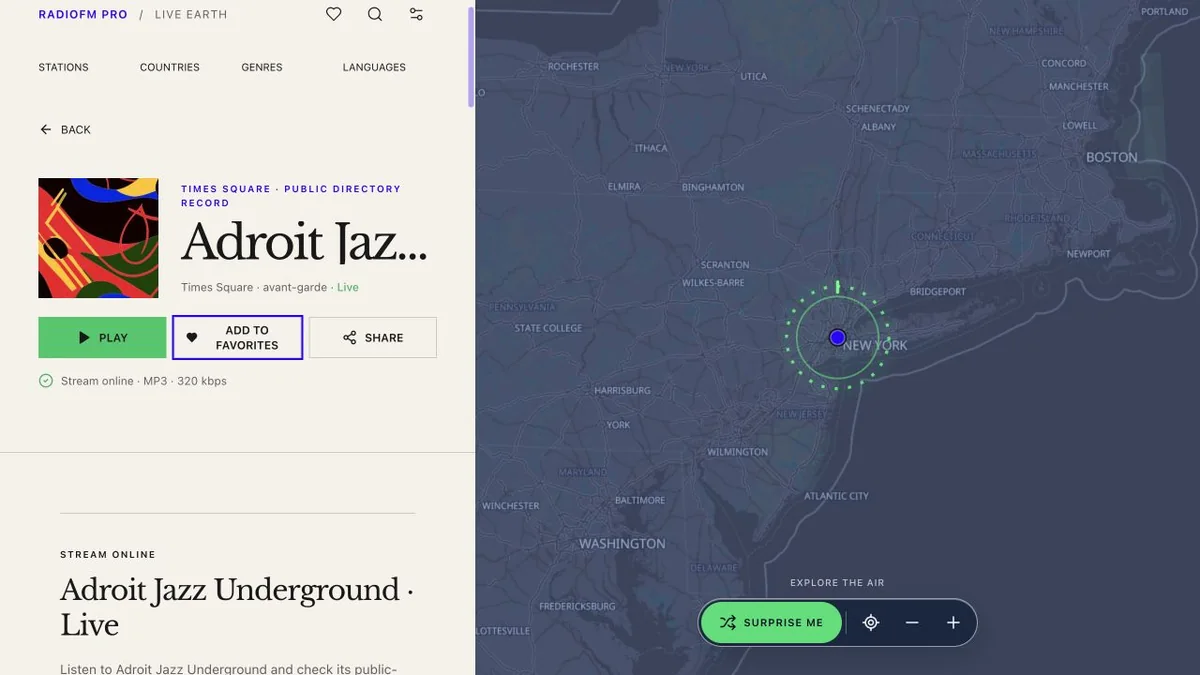
Station record checked July 21, 2026; codec, bitrate, tags, and source health can change when the public directory updates.
The page also states what it does not infer. It does not fill missing schedules, presenters, audience size, station history, or coverage with invented text. That restraint is more important than a long feature list. Directory pages often become misleading when thin source data is padded into confident prose.
I used the favorite control during the test. The site describes favorites and player preferences as browser-local, so basic saving does not require an account or precise-location permission. This is convenient and privacy-friendly, with an obvious tradeoff: clearing site storage or switching browsers can remove the collection. It is a bookmark feature, not a synchronized library.
Where the station data comes from
RadioFM Pro identifies Radio Browser as its primary public station directory. That source provides station identities, stream URLs, tags, language, codec, bitrate, and recent health signals. GeoNames is used for cautious place enrichment when a record has coordinates or a place that meets the product’s confidence rules.
This architecture explains both the size of the service and its unavoidable rough edges. A community radio directory can cover far more of the world than a hand-curated catalog, but records may be duplicated, mislabeled, temporarily unreachable, or slow to reflect a broadcaster change.
The site uses a “latest catalog status” as recent evidence. If a source responded during synchronization, that is useful. It does not mean the stream will respond ten minutes later, that a program is currently live, or that the external server has enough capacity for every listener.
The practical verification order is sensible: compare the station name, location, language, tags, and homepage domain; then use the broadcaster’s own website to confirm ownership, schedule, and replacement streams. The stable directory ID helps distinguish similarly named records, but it is not an official broadcast license.
Codec and bitrate labels need context
RadioFM Pro surfaces delivery metadata directly in result rows and station pages. In my station test, that was MP3 at 320 kbps. Other visible records used AAC, AAC+, OGG/Opus, or an unknown codec.
These labels describe how a stream is delivered, not how good its programming or source audio will sound. A higher nominal bitrate can be wasted on an inefficient codec, transcoded source, or noisy original. An Opus stream at a lower bitrate may sound better than its number suggests. Some stations also publish stale metadata that no longer matches the endpoint.
Browser support matters too. MP3 and AAC usually play broadly. HLS manifests and less common codecs can depend on the browser’s native media stack or an application fallback. Corporate filters, mixed-content rules, certificate problems, geo-blocking, redirects, and cross-origin behavior can interrupt an otherwise valid stream.
I would use codec and bitrate as troubleshooting clues and data-usage estimates, not as a quality ranking.
HLS and proxy recovery: implemented safeguards, not a promise
The public implementation includes logic for HLS URL handling and a proxy recovery path. The goal is to cope with cases where a browser cannot play a directory URL directly—for example, when an HLS playlist contains relative media URLs, a station redirects unexpectedly, or cross-origin behavior blocks a direct request.
That is valuable engineering because internet radio endpoints are inconsistent. It is also important to describe it accurately: I did not force Adroit Jazz Underground through every fallback during the session. The ordinary MP3 path reached the playing state. My confidence in HLS rewriting and proxy recovery comes from the exposed product behavior and its regression coverage, not from claiming the fallback fired when it did not.
A proxy can improve compatibility, but it adds another network hop and operating cost. It cannot repair a dead source, bypass legitimate regional policy, or convert every unsupported codec. If a station fails, the best diagnostic is to try a second station, retry once, check the broadcaster’s site, and record the page URL and time.
Search and filtering are designed for exploration
The search page accepts a station, city, genre, language, or frequency-like query, then combines it with explicit filters. Separate navigation pages for stations, countries, genres, and languages offer broader exploration. The “Surprise me” control on the map adds a useful escape from typing exactly what you already know.
I liked that the selected station stayed visually connected to the map and bottom player. The product does not make the user bounce among a search results page, a popup audio player, and a separate atlas.
The main limitation is discoverability on smaller screens. A map and a dense list compete for space, and a listener who only wants a familiar local station may find a plain search-first site faster. RadioFM Pro is strongest when place is part of the discovery task.
Privacy and account boundaries
Basic playback did not ask me to create an account. The public privacy explanation says favorites and preferences remain in browser storage, and precise device location is not required for listening. The map can therefore work from station-directory coordinates without learning the listener’s exact position.
External station websites and streams have their own policies. Starting playback necessarily contacts a broadcaster or delivery endpoint, which can observe ordinary network request information. Saving a favorite locally does not make the streaming connection anonymous.
Users should also inspect an external domain before entering personal or payment information. A directory link is a useful lead, not a security endorsement.
What I would improve
I would make the relationship between “60,000+ signals” and the much smaller current healthy count even more explicit near the header. The live 12,651 number was visible, but a short label such as “currently reachable in this index” would help users understand the scope immediately.
Duplicate station variants could also benefit from stronger grouping. MP3, AAC, and Opus versions are technically distinct streams, yet a casual listener may perceive them as repeated results. Grouping them under one station identity with a format selector would reduce noise when the source evidence supports that relationship.
Finally, browser-local favorites should have a visible export/import option if they do not already. Local-only storage is a good default, but a portable JSON or CSV backup would make the collection durable without requiring account synchronization.
Final verdict
This RadioFM Pro review found a real product behind the visual concept. Search narrowed a live directory, the Jazz filter changed the result set to 461 stations, the selected stream entered a playing state, the map focused on its directory location, the station page exposed source metadata and limitations, and the favorite action worked without an account.
The free online radio experience is best for listeners who enjoy geographic discovery and want codec, bitrate, language, tags, and source context close to the player. Its limits are largely the limits of public internet-radio data: a green status can age, a place can be approximate, a stream can disappear, and a directory record can be wrong.
RadioFM Pro handles those uncertainties more honestly than many directories. Use the map to explore, use the metadata to verify, and treat every station count and health signal as a timestamped observation rather than a permanent fact.