Most 5-letter-word websites feel the same after about 20 seconds.
You open one because you are stuck on Wordle, or trying to unscramble a set of letters, or trying to figure out whether the word you are staring at is even real. Then you get a page full of clutter, giant blocks of text, awkward filters, and results that somehow feel harder to scan than just thinking on your own.
That was my expectation going into 5LetterWords.io. I thought I would test it for a few minutes, confirm that it was basically another search-traffic site with a word box on top, and move on.
Instead, I kept using it.
Not because it was flashy. Not because it tried to look clever. Mostly because it solved the exact problem I had, quickly, and then stayed out of my way.
How I Actually Used It
I did not just look at screenshots and call it a review. I used the site the way I would normally use a word tool:
- In the Word Finder, I entered
ATPLEand got 8 valid five-letter matches instantly:LEAPT,LEPTA,PALET,PELTA,PETAL,PLATE,PLEAT, andTEPAL. - In the Unscrambler, I entered
ELTAPand got the same 8 exact anagrams, each with Scrabble scores. - In the Wordle Solver, I entered a near-finished board with green letters
C,R,_,N,Eplus gray lettersOSTL, and the tool narrowed the answer to exactly one word:CRANE. - On the 5-letter words starting with S page, I confirmed the page-specific count of
1,565words and checked that the same filtering UI stays available above the list.
Those are normal situations, not lab tests. That is also why I liked the site more than I expected.
The First Impression Is Calm, Clean, and Useful
The homepage opens with a working tool, not a lecture.
You land on a clean page with obvious navigation: Word Finder, Wordle, Unscramble, Blog. The main tool is right there. The fields are exactly the ones you would hope for: available letters, starts with, ends with, contains, pattern, and exclude.
I also liked that nothing tried to slow me down. No account wall, no pop-up asking for an email, no weird “premium solver” nonsense. I was typing into the tool almost immediately.
That sounds like a low bar, but a lot of free puzzle tools still manage to miss it.
The Word Finder Is the Part I Kept Going Back To
The Word Finder is where the site makes its strongest case.
I tested it with ATPLE because that is the kind of input I actually throw into these tools when I have some letters in my head but not a final answer yet. The page returned 8 valid results immediately, and more importantly, it returned them in a way that was easy to read.
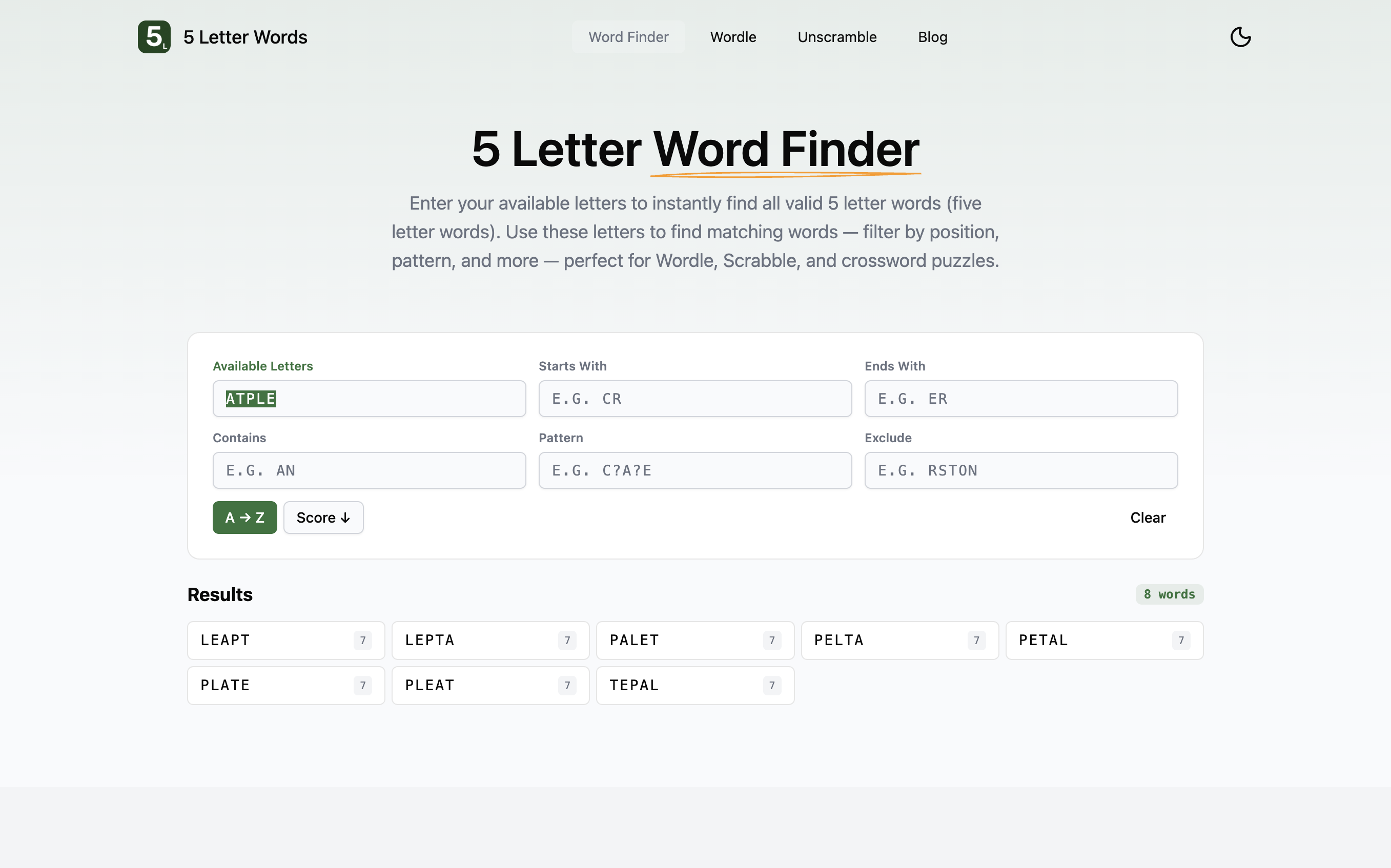
I did not get a huge wall of text or a messy table with too much information. I got compact result cards with the word and its Scrabble score. In this case that included LEAPT, PALET, PETAL, PLATE, and PLEAT.
What makes this tool work is that it supports different styles of solving without making the interface feel busy. If I am thinking like a Wordle player, the pattern and exclude fields matter. If I am thinking like a Scrabble player, the score display matters. If I just need to see what can be made from a handful of letters, the first field is enough.
The response is also fast enough that the tool disappears into the background. That is exactly what I want from a utility like this.
The Wordle Solver Feels Like It Was Built By Someone Who Actually Plays Wordle
The Wordle Solver is not just a rebadged word filter. It is structured around the way Wordle players actually think: green letters in exact slots, yellow letters that belong in the word but not in those positions, and gray letters to eliminate.
That matters because a lot of so-called Wordle helpers are really just generic search forms with Wordle branding on top. This one is better than that.
For a realistic test, I entered C, R, _, N, E as green positions and OSTL as gray letters. The solver reduced the field to one answer: CRANE.
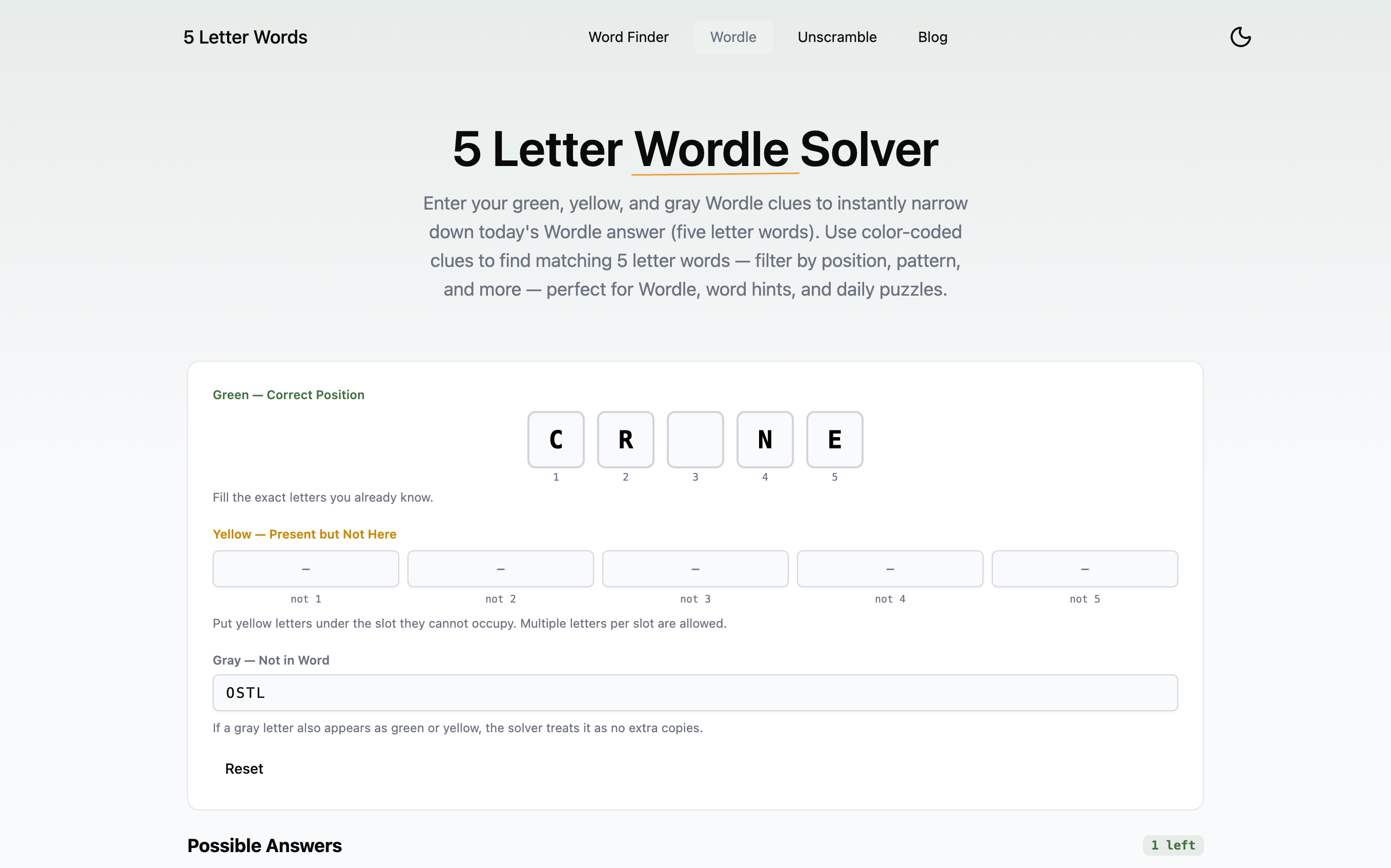
I liked how literal the tool felt. Green letters go in green slots. Yellow letters go under the positions they cannot occupy. Gray letters go in one exclusion field. If you have played Wordle more than a few times, you know immediately how to use it.
I also appreciate that the result state is clear. It does not leave you guessing whether one answer is “recommended” or whether the list is still open. In my test, it plainly said there was 1 left and showed CRANE.
That kind of clarity is useful when you are halfway through a game and do not want to spend extra brainpower learning the tool.
The Unscrambler Solves the Exact Problem It Should
At first glance, the Unscrambler looks close to the Word Finder. In practice, it earns its place because it frames results around exact anagrams and partial matches instead of general filtering.
When I entered ELTAP, the page returned 8 exact anagrams right away, including LEAPT, PETAL, PLATE, and PLEAT.
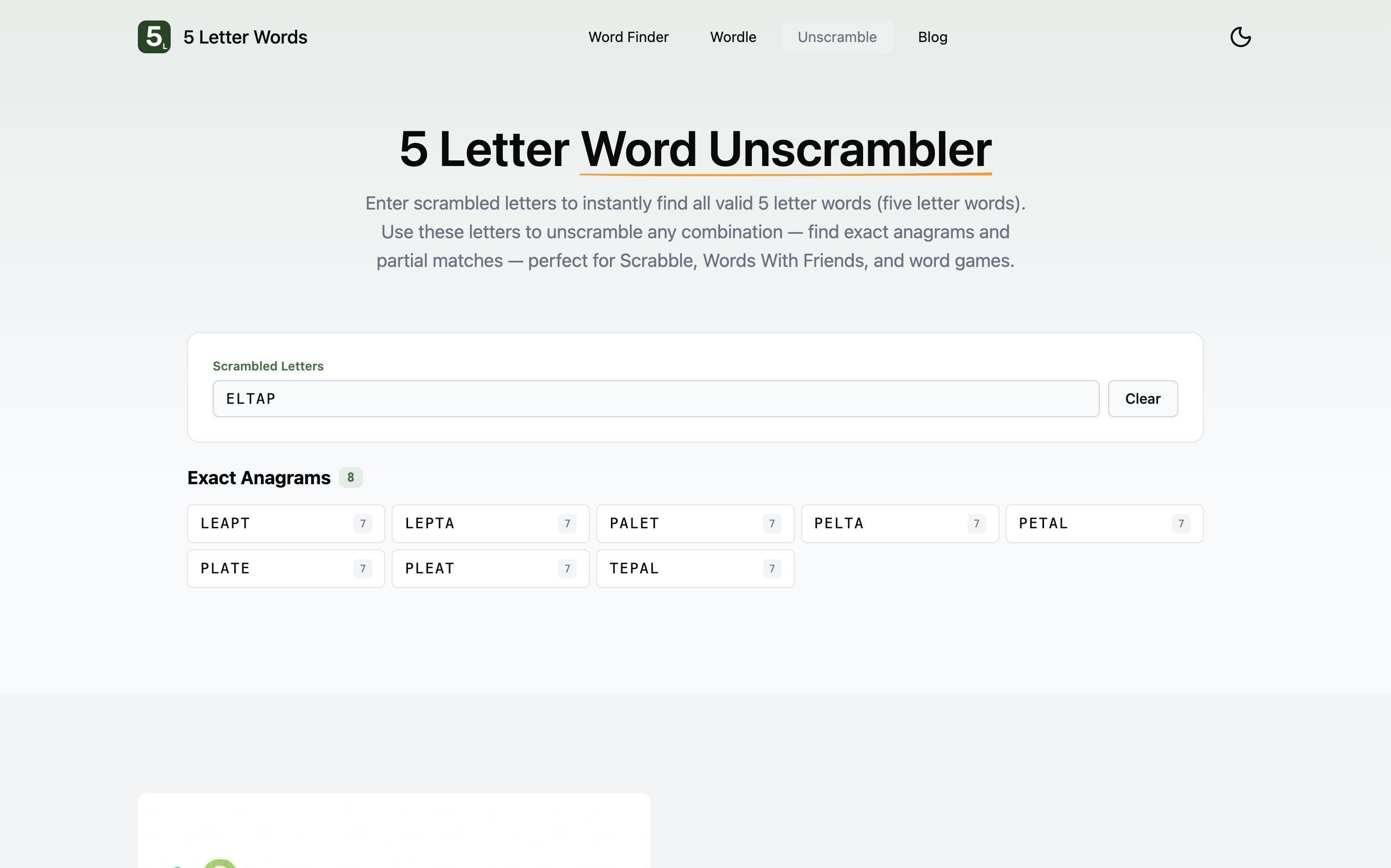
That sounds simple, but it is exactly what I want from an unscrambler. If I am solving a jumble, I do not want a broader search experience first. I want the exact anagrams, in front of me, immediately.
The site gets that right. It does not make me do extra work to tell it what kind of task I am doing.
The Word-List Pages Are More Useful Than They Look
This is the part that surprised me most.
Most big alphabetized word-list pages feel like dead ends. You land there from search, see a giant list, and leave.
On 5LetterWords.io, the starting-with-S page is actually helpful if you already know part of the answer. The page clearly tells you there are 1,565 five-letter words starting with S, but it also keeps the same filter bar at the top so you can narrow the list without starting over somewhere else.
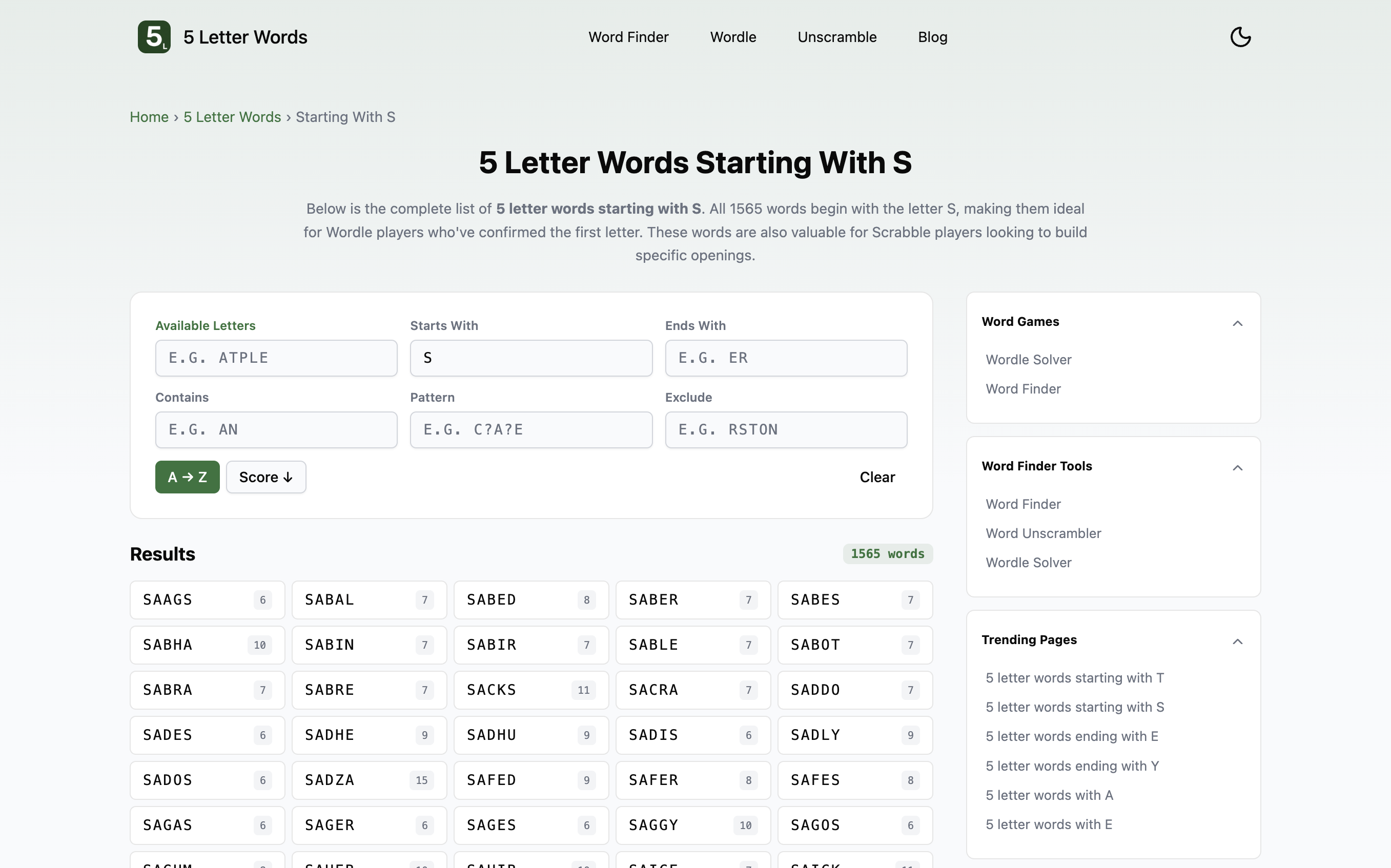
That is what made the page feel useful instead of decorative. If I know the first letter already, this page is a faster starting point than a blank search field.
The same idea likely makes the other starting-with, ending-with, and contains-letter pages more useful than they first appear.
What I Liked Most
After using the site across a few different scenarios, the strongest parts were pretty consistent:
- It is fast. Every tool responded quickly enough that I never had that “this website is thinking too hard” feeling.
- It is clear. The fields make sense, the result cards are easy to scan, and the pages do not feel overloaded.
- It covers the obvious use cases well. Word Finder, Wordle Solver, and Unscrambler are the three tools most people actually need, and all three work.
- It keeps Scrabble scores visible. That makes the results more useful when you are not solving Wordle and just want the highest-value word.
- It does not add friction. No account, no forced app behavior, no unnecessary steps.
That last point matters more than it sounds. A lot of utility sites make the user feel like they are being managed. This one mostly just helps.
A Small Thing It Gets Right
One thing I noticed while moving between pages is that the site stays consistent.
The Word Finder, Wordle Solver, Unscrambler, and word-list pages all feel like parts of the same product instead of random tools stitched together. That makes the site easier to trust because you stop wondering whether every page was built by a different person.
That kind of consistency is easy to overlook, but it is part of why I kept using it.
What It Does Not Try To Be
It is worth being honest about what this site is not.
This is not a full dictionary site. If you want deep definitions, origin notes, or long example sentences for every word, that is not really what it is built for. It is a helper site. It is for finding, filtering, narrowing, and checking words quickly.
I also would not call it beautiful in the dramatic sense. It is clean, simple, and functional. That worked for me, but if someone wants a more playful or game-like interface, they may find it a bit plain.
For me, that tradeoff is fine. I would rather have quick, readable results than a site trying too hard to entertain me while I am stuck on a puzzle.
Who I Think This Is Best For
After using it directly, I think the site is especially good for:
- Daily Wordle players who want a cleaner way to work through green, yellow, and gray clues.
- Scrabble or Words With Friends players who care about quick scans and score values.
- Anyone solving jumbles or anagrams who wants exact matches fast.
- Crossword players who already know part of the answer and need a better starting point than a blank search box.
- People who hate bloated utility websites and just want a tool that works.
That last group includes me.
Final Verdict
After actually using it, I think 5LetterWords.io is the best 5-letter-word helper I have used in a while.
Not because it does something magical. Mostly because it does the normal things well.
The Word Finder is fast and flexible. The Wordle Solver is genuinely useful. The Unscrambler gives exact anagrams without fuss. The word-list pages are more practical than they look. And the whole site is simple enough that you can open it, solve your problem, and get on with your day.
That is why I kept the tab open.
If you play Wordle regularly, do the occasional anagram search, or just need a five-letter word finder that does not annoy you, this one is worth bookmarking.